FCP Music Cue Sheet
Automatic music reporting for Final Cut Pro.
Detect, analyze, and export accurate track usage — without manual logging.
The professional solution for music reporting in Final Cut Pro.
FCP Music Cue Sheet is a dedicated macOS application designed to eliminate the manual labor of timeline logging. It analyzes your FCPXML files and instantly generates accurate music reports, ready for delivery to broadcasters and rights management societies.
FCP Music Cue Sheet is designed to automatically detect and analyze all audio tracks used in a Final Cut Pro project. It calculates usage based on precise durations, generates a complete list of tracks, and allows you to review and enrich metadata such as Title, Composer, Album, and more — either manually or by matching data from your iTunes library when available.
The application exports accurate reports in CSV or PDF format, with durations clearly organized by usage type.
It is important to note that FCP Music Cue Sheet is not a fully standardized cue sheet generator. Different countries and broadcasters require specific formats based on local regulations and proprietary standards.
Instead, the app focuses on automating the most time-consuming part of the process: detecting, calculating, and organizing music usage.
The resulting CSV or PDF can then be used as a reliable base to compile official cue sheets, without the need for manual time calculation or track listing.
Tutorial Video
What’s New?
The latest version has been entirely refactored with a next-generation analysis engine, built to handle the complexity of modern post-production workflows.
- Multi-Project Support: Seamlessly import .fcpxmld bundles or XML files containing multiple projects. A new selection screen allows you to choose exactly which sequence to analyze before parsing begins.
- Advanced Parsing Engine: Deep resolution of complex Final Cut Pro structures, including multi-level Compound Clips, Auditions (only the active clip is processed), and Sync Clips.
- Frame-Accurate Precision: Accurate calculation of TC In, Out, and Duration for all major frame rates, including 23.98, 25, and 29.97 (both Drop-Frame and Non-Drop-Frame).
- Dynamic Role Management: Audio roles and sub-roles are detected dynamically from your timeline with no predefined assumptions, allowing you to navigate your project’s unique audio hierarchy intuitively.
Key Features
The "Killer Feature": Instant Role-Based Usage
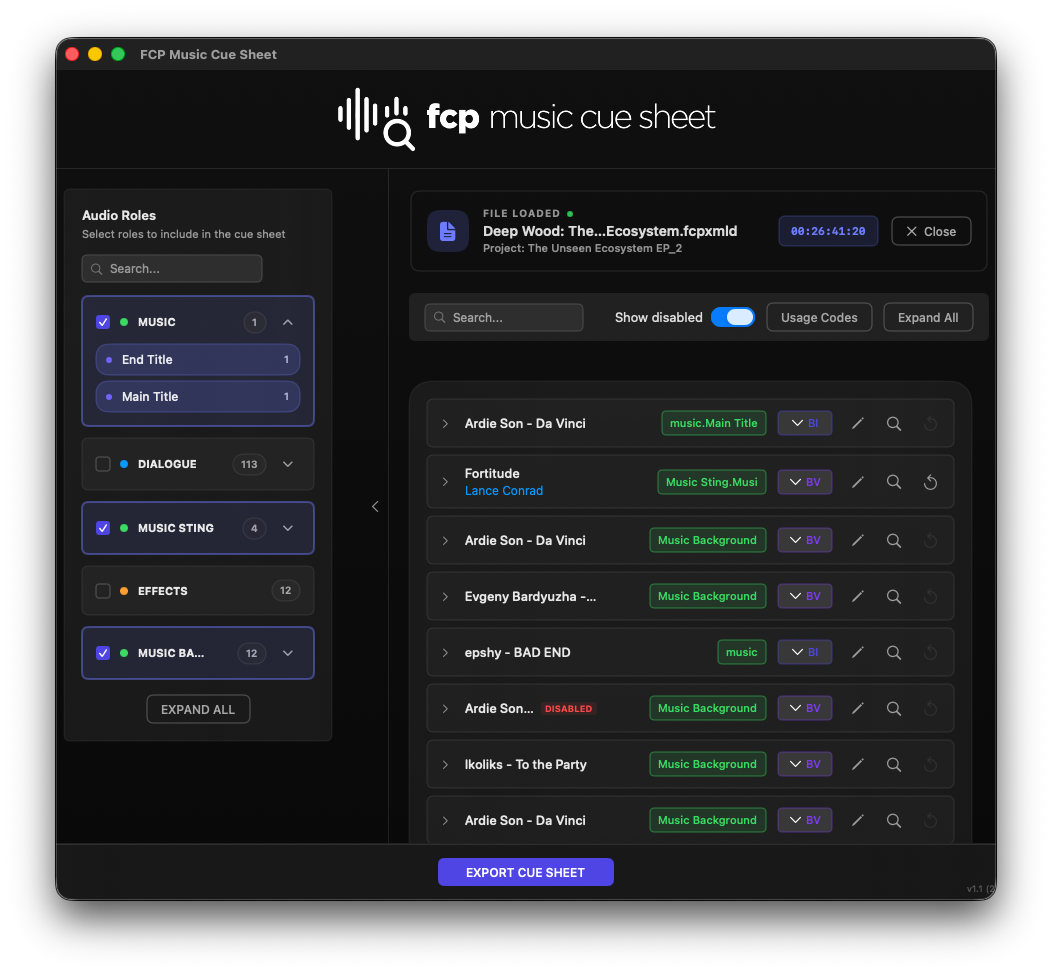
Save hours of repetitive work. If you have organized your project with specific roles, you can assign a Usage Code (BI, BV, VI, VV, MT, ET) to an entire role or sub-role with a single click. Individual manual overrides remain available for every occurrence in the list.
iTunes Metadata Enrichment
Enhance the quality of your reports. Through integrated iTunes search, the app automatically retrieves Title, Artist, Album, and Label information. You maintain total control to manually edit any field or reset data to the original XML state.
"Show Disabled" Verification
The new Show Disabled toggle allows you to reveal muted clips, inactive Auditions, or clips with zero volume. This verification tool helps you clearly distinguish what is active in the timeline versus what will be excluded from the final export.
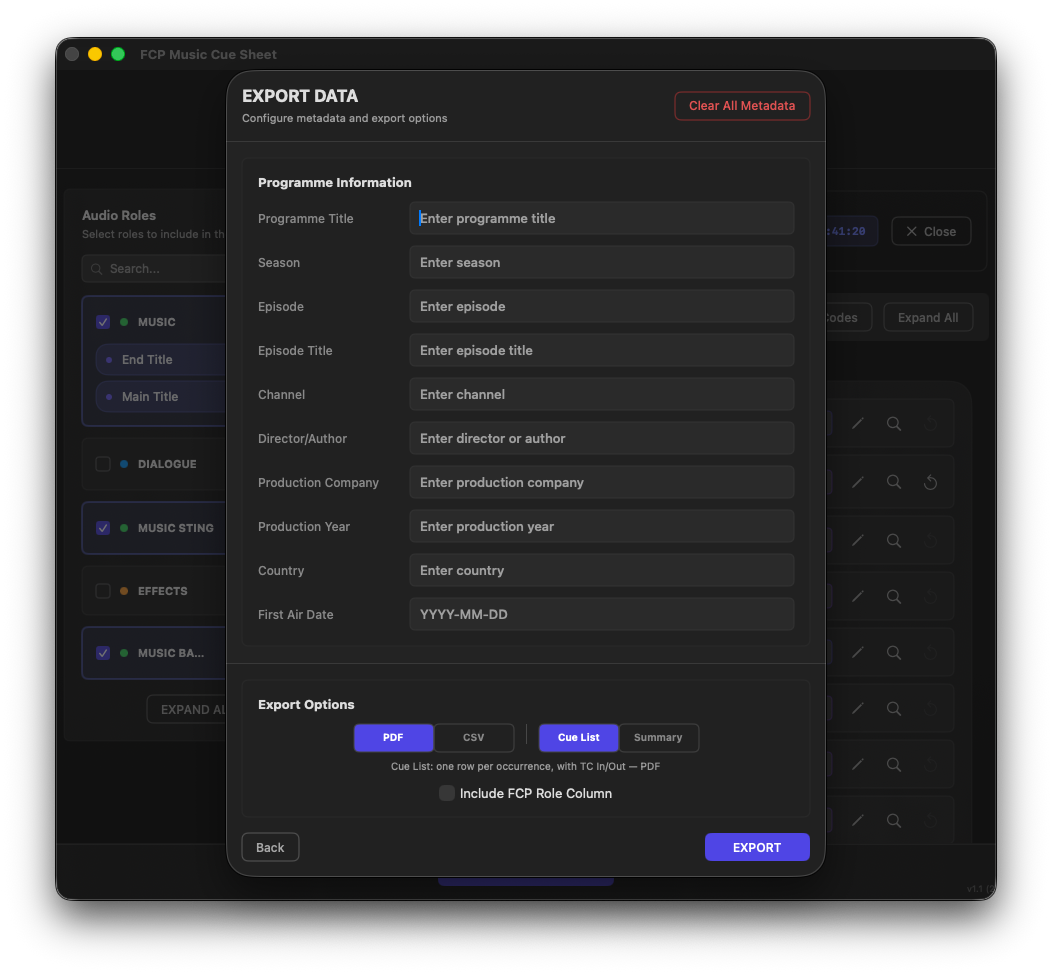
Flexible Export: Cue List vs. Summary
Choose how to present your data based on delivery requirements:
- Cue List: A detailed chronological breakdown of every music instance with specific timecodes and usage.
- Summary: Automatically aggregates tracks with identical names and usage, providing a single row with the total summed duration.
Export your final reports as Professional PDFs or CSV files for further processing in Excel or Numbers.
Optimized Workflow
- Export your project from Final Cut Pro as an FCPXML.
- Drag the file into the app and select your desired sequence.
- Refine metadata and assign Usage Codes (individually or by Role).
- Save your project as an .mcsheet file to resume work at any time.
- Export a production-ready Cue Sheet.
FCP Music Cue Sheet: Accuracy, speed, and the professional standard for your post-production workflow.
FCP Music Cue Sheet is an independent tool and is not affiliated with or endorsed by Apple Inc. Final Cut Pro is a trademark of Apple Inc.
Downloads and Templates
Get FCP Music Cue Sheet
Download the app from the Mac App Store.
Cue Sheet PDF Template
Example of generated cue sheet in PDF format to see the final professional result.
User Guide
Complete manual with all features and tips to get the most out of FCP Music Cue Sheet.
Safe & Secure: Registered Apple Developer. All apps are notarized for macOS.