Add Chapter Markers in Final Cut Pro
Create and name your Chapter Markers directly in your Final Cut Pro timeline.
The fastest way to turn Final Cut Pro Chapter Markers into YouTube chapters.
Generate a clean, YouTube-ready chapter list directly from Final Cut Pro.
With the Chapter Tool Workflow Extension, simply drag a project, event, or library from the Final Cut Pro browser, review the detected chapters, and copy the finished list to your clipboard.
No manual FCPXML export required.
Free Download


Chapter Tool 2.0 introduces a Final Cut Pro Workflow Extension designed to make chapter creation faster and more direct.
Open Chapter Tool from the Workflow Extensions menu, then drag a project from the Final Cut Pro browser into the extension.
Chapter Tool reads the project data, detects its Chapter Markers and prepares the chapter list without modifying your timeline.
Drag. Review. Copy. Paste.
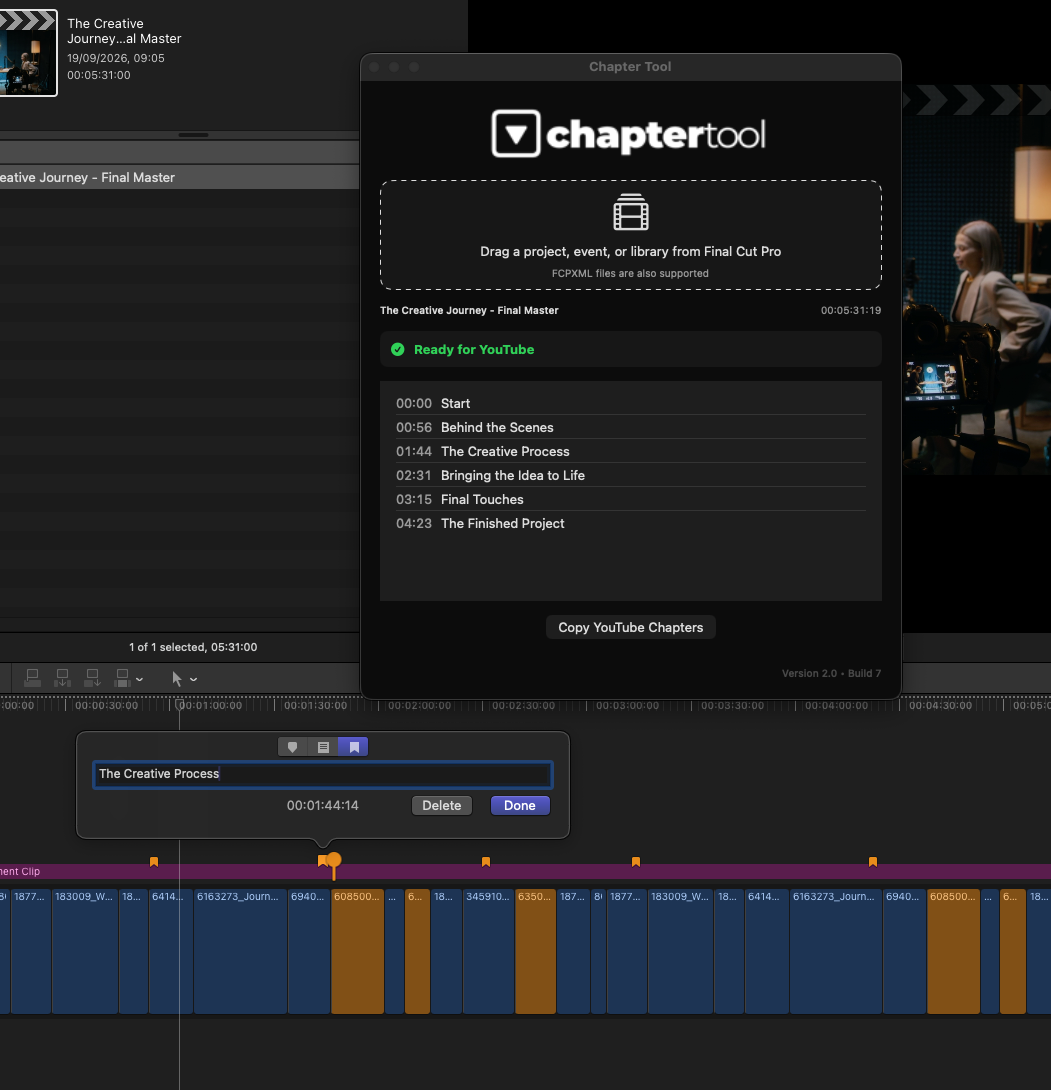
Create and name your Chapter Markers directly in your Final Cut Pro timeline.
Open the Chapter Tool Workflow Extension and drag a project directly from the Final Cut Pro browser.
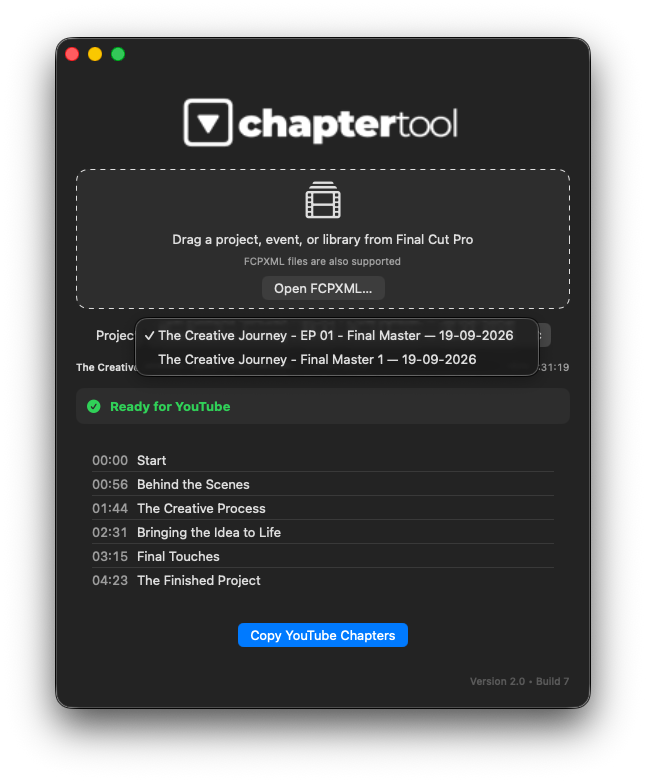
You can also drag an event or an entire library. If multiple projects are detected, simply choose the timeline you want to process.
Chapter Tool detects the Chapter Markers, converts their positions into YouTube timestamps and checks the resulting chapter structure.
When the list is ready, click Copy YouTube Chapters and paste it directly into your YouTube video description.
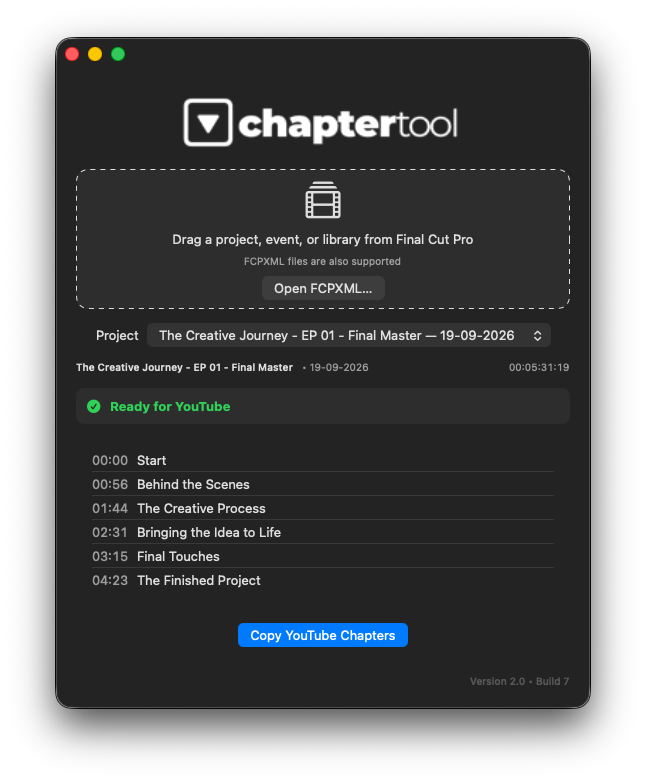
Final Cut Pro works with frame-accurate positions. YouTube chapters use whole-second timestamps and have specific requirements.
Chapter Tool handles that conversion automatically.
Any automatic timestamp adjustment is shown before you copy the list.
Chapter Tool is a read-only workflow.
Automatic timestamp adjustments apply only to the generated YouTube chapter list. Chapter Tool never moves, renames, deletes or modifies Chapter Markers in your Final Cut Pro project.
If an editorial change is required, make it in Final Cut Pro and simply drag the project into Chapter Tool again.
Chapter Tool 2.0 intentionally focuses on Final Cut Pro Chapter Markers.
Standard markers are ignored, keeping the generated list aligned with the chapter structure you prepared in your timeline.
Your result is clean and ready to paste:
No manual timestamp conversion.
No manual formatting.
Chapter Tool isn't limited to individual projects.
Drag a project, event, or library from the Final Cut Pro browser into the Workflow Extension.
When the source contains multiple projects, Chapter Tool detects the available timelines and lets you select the one you want to process.
This makes it just as convenient for a single video as for libraries containing multiple projects.
Prefer a standalone workflow?
Chapter Tool 2.0 also works as a regular macOS application, without opening the Workflow Extension.
Drag an exported .fcpxml or .fcpxmld file into Chapter Tool—or use Open FCPXML—and use the same chapter-processing workflow.
Multi-project FCPXML documents are supported, with a project selector when multiple timelines are detected.
So you can choose the workflow that fits your edit:
Final Cut Pro → Workflow Extension
FCPXML → Standalone App
Chapter Tool is a lightweight utility for editors and creators who use Final Cut Pro to produce:
Instead of manually converting timeline positions and checking chapter spacing, Chapter Tool handles the technical preparation so you can go directly from your Final Cut Pro markers to your YouTube description.
Chapter Tool 2.0 focuses on one job:
Turning Final Cut Pro Chapter Markers into a valid, ready-to-copy YouTube chapter list.
Chapter editing remains where it belongs: in your Final Cut Pro timeline.
Chapter Tool handles detection, timestamp conversion, validation and formatting.
Chapter Tool processes project information locally on your Mac.
Project data and FCPXML are not uploaded or transmitted to external services. In standalone mode, Chapter Tool accesses only files explicitly selected or dropped by the user.
Your Final Cut Pro projects remain unchanged.
Turn Final Cut Pro Chapter Markers into a clean, validated and ready-to-copy YouTube chapter list.
Complete manual with all features and tips to get the most out of Chapter Tool.
Safe & Secure: Registered Apple Developer. All apps are notarized for macOS.