ATEM TO FCP
From Live Switch to Final Cut Pro — Instantly.
Turn ATEM ISO recording sessions into clean, fully editable Final Cut Pro projects—ready for post-production in seconds.

ATEM TO FCP is a professional macOS application designed to bridge live production and post-production. It reads the ATEM DRP recording session and reconstructs the original production as FCPXML, preserving the structure and timing of the live switch.
Camera cuts, transitions, Media Player graphics, Color sources, upstream and downstream keys, Fade to Black events, Flying Key animations, and supported audio configurations are automatically translated into an editable Final Cut Pro project.
The ATEM session remains the edit. You choose how far to take it in post.
What’s New in Version 1.6
Version 1.6 is a major update, extensively redesigned to handle more advanced production workflows—from independently recorded camera originals and external multitrack audio to long recordings and complex multi-session projects.
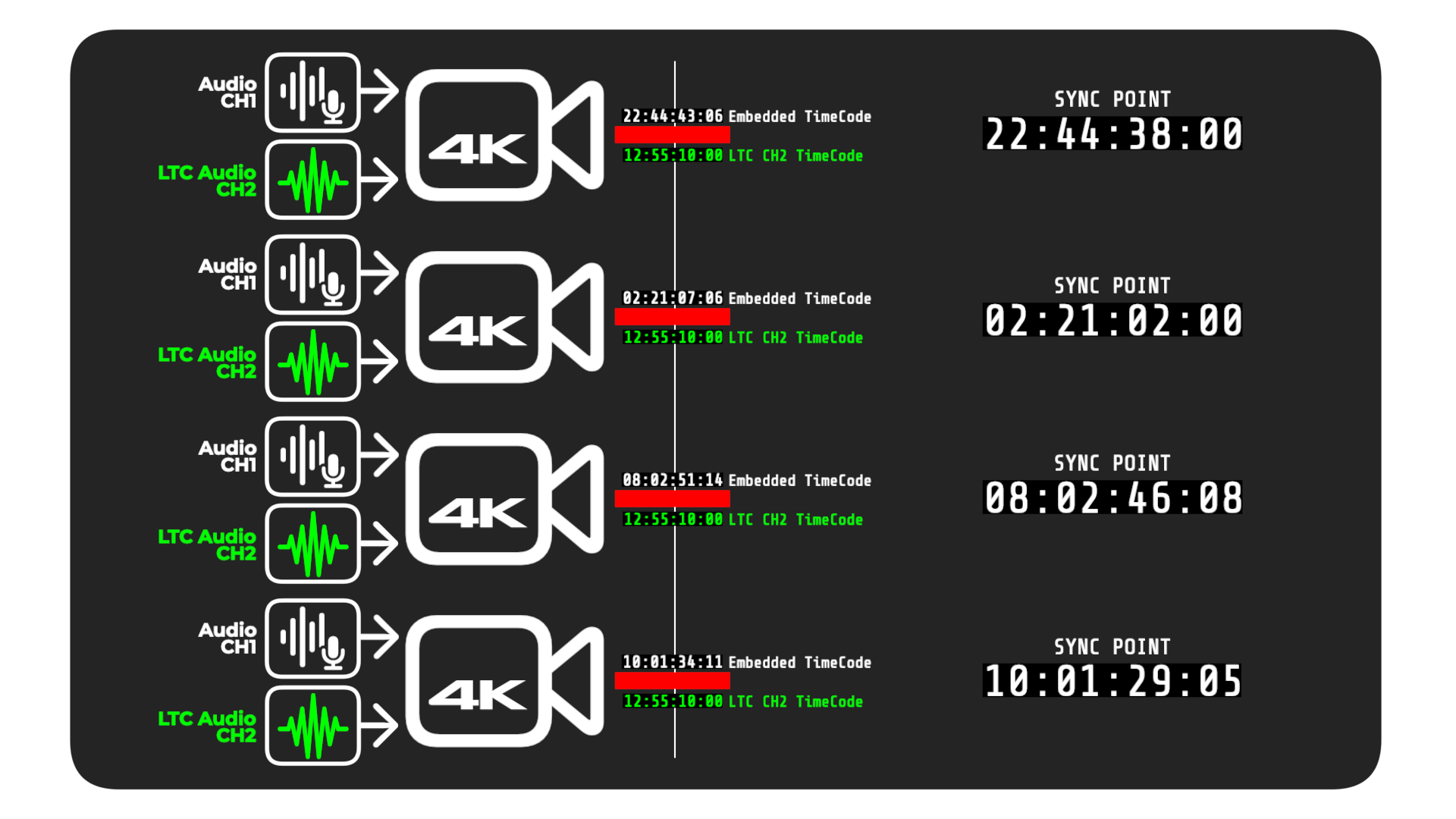
Audio LTC Synchronization
Sync cameras even when their embedded timecode doesn’t match.
ATEM TO FCP can now synchronize replacement camera recordings using LTC recorded on an audio channel—even when the camera’s embedded timecode has no relationship with the ATEM session.
The application finds matching LTC between the replacement camera recording and the corresponding ATEM ISO audio, creating a synchronization bridge between two independent timecode systems.
No matching embedded timecode required.
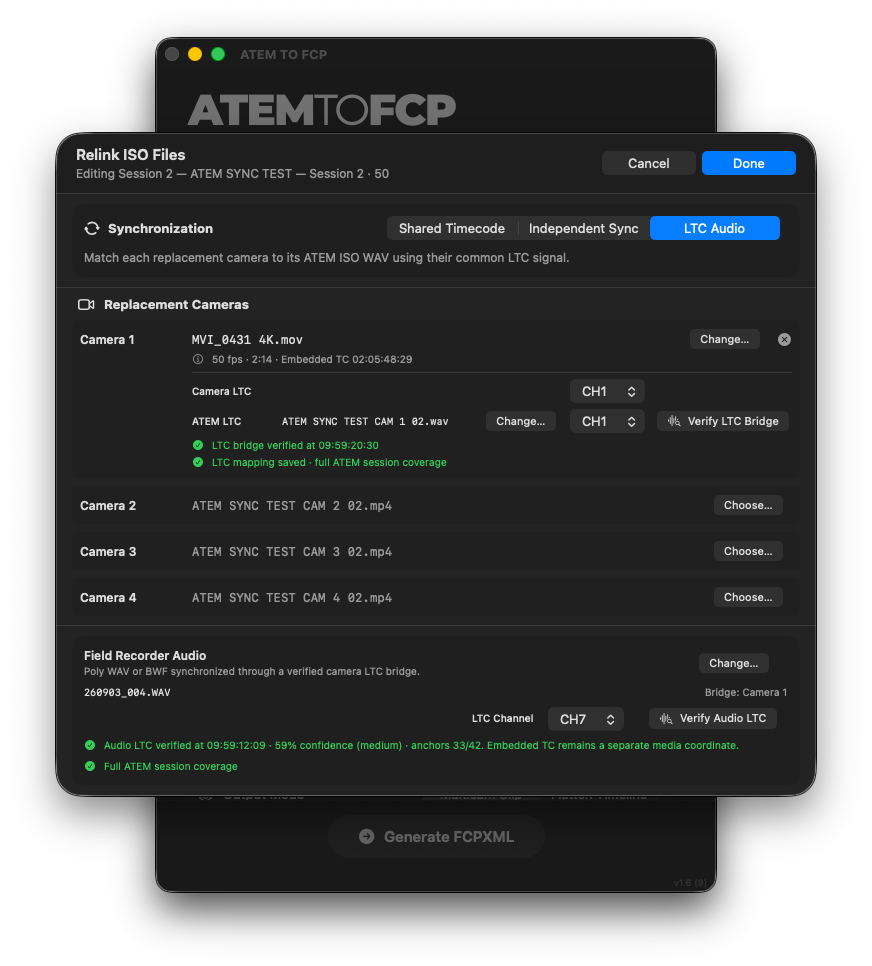
Relink to Camera Originals
Keep the live edit. Replace the media.
Replace ATEM ISO recordings with higher-quality camera originals, including internally recorded 4K media, while preserving the camera cuts and timing of the original production.
Choose the synchronization method that fits your setup:
- Shared Timecode
- Independent Sync
- Audio LTC
Replacement recordings can start before the ATEM session, start late, end early, or continue beyond it. ATEM TO FCP calculates the available coverage while keeping the original edit intact.
External Multitrack Audio
Bring your field-recorder audio into the reconstructed project.
Integrate stereo, polyphonic WAV, and BWF recordings from field recorders such as the Zoom F6.
External recordings can be synchronized using the available synchronization workflows and incorporated directly into the Final Cut Pro project.
Select the channels you want to use, exclude an LTC channel from the final mix when applicable, and compensate for a repeatable recording delay when necessary.
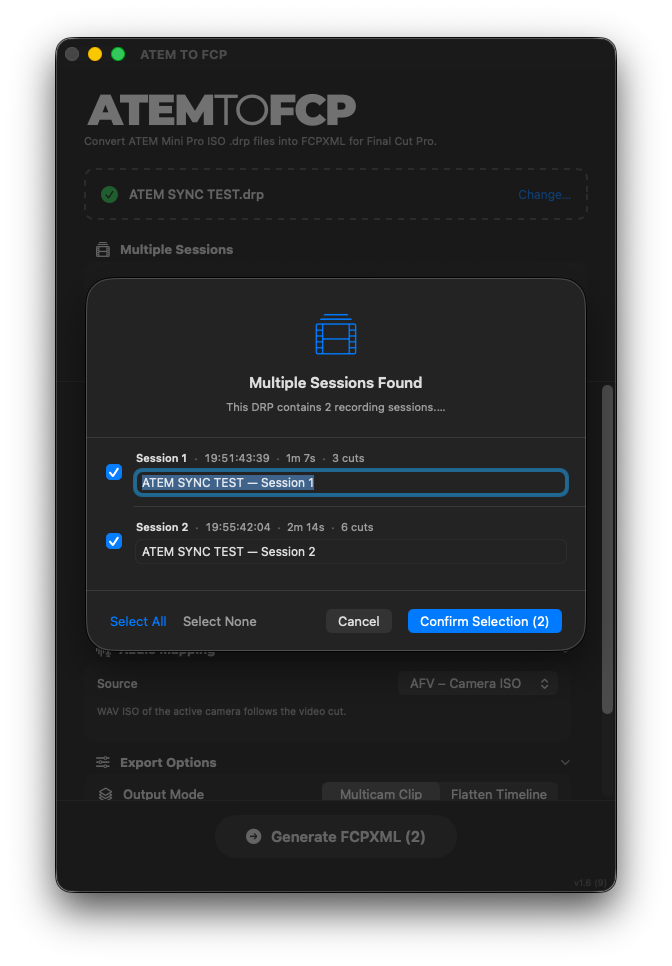
Multi-Session Workflow
Multiple ATEM sessions. One organized workflow.
A single DRP can contain several independent recording sessions.
Version 1.6 lets you select the sessions you need and navigate between them directly from the main interface.
Each session keeps its own camera media, Relink configuration, synchronization results, missing-media status, and coverage information—preventing media from one recording from being mixed with another.
When you’re ready, export the selected sessions together as individual FCPXML projects.
Long Recording Support
Continuous productions, even when ATEM splits the ISO files.
During long recordings, ATEM may divide a camera ISO into multiple sequential video files.
ATEM TO FCP identifies valid recording segments using source relationships and timecode continuity, then reconstructs them as continuous camera sources.
Segment changes are handled automatically in both Multicam angles and Flatten master sync clips—even inside projects containing multiple ATEM recording sessions.
New in 1.6.1 — Cleaner Multicam Clips
Keep your multicam projects focused.
Version 1.6.1 adds a new Camera Angles option for Multicam exports, letting you choose which cameras are included in the generated multicam clip.
Choose All Recorded Cameras, Available Cameras, or Used Cameras Only to include exactly the angles you need while avoiding unnecessary or unavailable cameras.
This is especially useful with larger ATEM switchers, where only some of the available camera inputs may actually be used during a production.
Two Ways to Edit
Multicam
Generate a native Final Cut Pro Multicam project with switchable camera angles and available audio sources.
Choose whether to include all recorded cameras, only cameras with available media, or only cameras actually used during the production.
Change camera decisions after the event, access alternate angles, and continue editing with the flexibility of a native multicam workflow.
Flatten
Reconstruct the switched Program directly on the Final Cut Pro primary storyline.
Version 1.6 uses reusable camera master sync clips, so grading, effects, audio adjustments, and other changes applied inside a camera master can be reflected across its occurrences throughout the edit.
Same ATEM production. Two different editing workflows.
More Than Camera Cuts
ATEM TO FCP reconstructs much more than the Program camera sequence.
Supported ATEM events include:
- Media Player graphics and stills
- Color 1, Color 2, and Color Bars
- Upstream and Downstream Keys
- Fade to Black
- Flying Key animations
- Program and key transitions
- Manual T-bar transitions
Flying Key movements are translated into Final Cut Pro transform animation, preserving supported position and scale changes.
When different still images are loaded into the same Media Player during a production, each occurrence retains the graphic that was actually on air at that moment.
Frame-Accurate Reconstruction
The conversion engine preserves the editorial timing and layer relationships recorded during the ATEM production.
Program transitions, USK and DSK events, graphics, and overlapping layers are reconstructed according to their recorded timing.
When an ATEM transition has no direct Final Cut Pro equivalent, its editorial duration and alignment are preserved using the closest supported representation.
ATEM TO FCP supports integer and fractional ATEM frame rates, including 23.976, 29.97, and 59.94, with Drop Frame and Non-Drop Frame handling where applicable.
Sessions that cross midnight are normalized automatically to maintain timeline continuity.
Flexible Audio Mapping
Choose the audio strategy that fits your production:
- ATEM PGM
- AFV Camera ISO
- Mic 1
- Mic 2
- Synchronized External Audio
Multicam projects retain applicable audio angles for additional flexibility during post-production.
HD ATEM. 4K Finish.
Relinking HD ATEM ISO recordings to higher-resolution camera originals?
Create your Final Cut Pro project in HD, QHD, 4K UHD, or 4K DCI while preserving the original ATEM frame rate and edit timing.
Output Resolution changes the Final Cut Pro project format—it does not transcode or modify your source media.
Local Processing. Your Media Stays on Your Mac.
Project analysis, media validation, synchronization, LTC processing, and FCPXML generation are performed locally.
ATEM TO FCP operates within the macOS App Sandbox and accesses only files and folders you explicitly select.
Your recordings do not need to be uploaded for conversion.
From Live Production to Post — Without Rebuilding the Edit
The ATEM recording remains the editorial source of truth.
ATEM TO FCP preserves the original production while giving you the freedom to replace camera media, synchronize external audio, change camera angles, grade your footage, and continue the edit in Final Cut Pro.
From a single live production to long recordings and complex multi-session projects, ATEM TO FCP turns your ATEM session into a structured Final Cut Pro workflow.
System Requirements
- macOS 15.0 or later
- Apple Silicon or Intel Mac supported by the application build
- Final Cut Pro with FCPXML 1.13 import support
- Supported ATEM ISO recording session and associated media
Downloads
Get ATEM TO FCP
Download ATEM TO FCP from the Mac App Store and turn supported ATEM ISO recording sessions into editable Final Cut Pro projects.
User Guide
Complete manual with all features and tips to get the most out of ATEM TO FCP.
Safe & Secure: Registered Apple Developer. All apps are notarized for macOS.